Sunday, August 09, 2009
Debugging TLF source code
I was getting the error 1120: Access of undefined property debug. Then I explored the build file(ant script), which is used to build the swc file. There I found two arguments passed to compc:
<define name="CONFIG::release" value="${rel}"/>

Now, what define does ?
compiler.define: define a global AS3 conditional compilation definition, e.g. -define=CONFIG::debugging,true or -define+=CONFIG::debugging,true (to append to existing definitions in flex-config.xml) -->
I added the following arguments in Additional Compiler Arguments to make my Project problems free.-define+=CONFIG::debug,true -define+=CONFIG::release,false
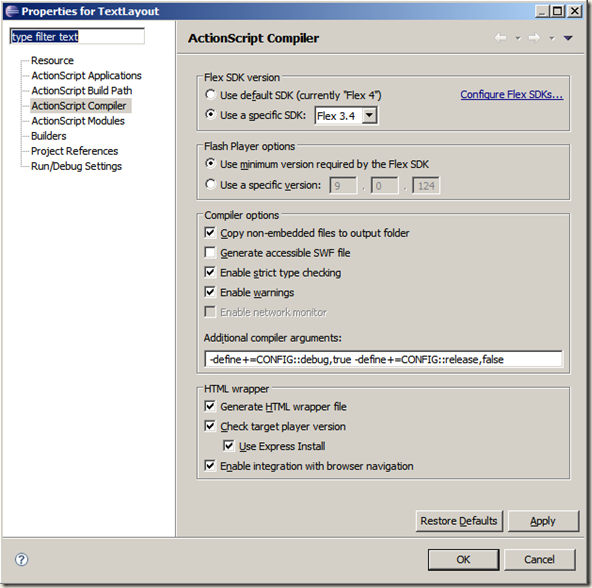

Then it followed with the following errors:
1046: Type was not found or was not a compile-time constant: ContentElement
1046: Type was not found or was not a compile-time constant: GroupElement
1046: Type was not found or was not a compile-time constant: TextBlock
1046: Type was not found or was not a compile-time constant: TextLine
It was obvious, as these all classes are new, so its a Flash Player mismatch in my settings, after changing my flash player version from flash player 9 to flash player 10, all Problems are gone.
Hope this helps someone who is struggling to debug the tlf source code.


Sunday, July 26, 2009
Flash Text got better
TLF is a Text Layout Framework to handle some complex text, selection, editing. It can be used with Flash Professional or Flex. It is framework agnostic as the entire API is in as3 so it can be used with either flex framework or framework which is available in Flash Professional. TLF is a wrapper on top of FTE(Flash Text Engine), which is new in Flash Player 10. TLF renamed many times, it was previously known as Text Layout Foundation/vellum and now Text Layout Framework.
When to use FTE ?
Flash Text Engine deals with Line and Paragraph Layout and TextLine rendering. When you need only static text then its best to make use of FTE.
When to use TLF ?
When you want to deal with Paragraph Layout, Selection, Editing then make use of TLF. TLF has a markup for text, which can be parsed using E4X. Its basically XML.
Where to find TLF Source?
You will have to checkout from SVN, instructions and other details are available at the below location:
http://opensource.adobe.com/wiki/display/tlf/Text+Layout+Framework
How to get started, which classes I should use etc ?
Below are links to some post I found useful to understand TLF:
http://corlan.org/2009/01/19/how-to-use-text-layout-framework-in-flex-32-or-air-15/
http://corlan.org/2009/02/12/how-to-add-a-scrollbar-to-text-layout-framework/
http://www.insideria.com/2009/06/utilizing-flash-text-layout-fr.html
and I found a nice presentation from one of TLF engineer, Robin Briggs. You can watch it here:
Text Component Library for Flash Player 10
Demo:
http://labs.adobe.com/technologies/textlayout/demos/
Thanks for stopping by, I will be writing few articles on TLF, keep checking or follow on twitter to get updates.
Cheers,
Chetan Sachdev
Thursday, May 14, 2009
ArgumentError: Undefined state 'up'.
Problem:
ArgumentError: Undefined state 'up'.
    at mx.core::UIComponent/getState()[C:\flexsource\frameworks\projects\framework\src\mx\core\UIComponent.as:9030]
    at mx.core::UIComponent/findCommonBaseState()[C:\flexsource\frameworks\projects\framework\src\mx\core\UIComponent.as:9050]
    at mx.core::UIComponent/commitCurrentState()[C:\flexsource\frameworks\projects\framework\src\mx\core\UIComponent.as:8881]
    at mx.core::UIComponent/creationCompleteHandler()[C:\flexsource\frameworks\projects\framework\src\mx\core\UIComponent.as:10429]
    at flash.events::EventDispatcher/dispatchEventFunction()
    at flash.events::EventDispatcher/dispatchEvent()
    at mx.core::UIComponent/dispatchEvent()[C:\flexsource\frameworks\projects\framework\src\mx\core\UIComponent.as:11262]
    at mx.core::UIComponent/set initialized()[C:\flexsource\frameworks\projects\framework\src\mx\core\UIComponent.as:1513]
    at mx.managers::LayoutManager/doPhasedInstantiation()[C:\flexsource\frameworks\projects\framework\src\mx\managers\LayoutManager.as:757]
Solution: You have defined a skin for a component and that skin expects some states to be defined for the component. e.g. a Button expects 4 states to be defined in Skin. Below is a basic skin for a Button.
<?xml version="1.0" encoding="utf-8"?>
<s:SparkSkin xmlns:fx="http://ns.adobe.com/mxml/2009" xmlns:s="library://ns.adobe.com/flex/spark" xmlns:mx="library://ns.adobe.com/flex/halo" >

    <s:states>
        <s:State name="up"/>
        <s:State name="over"/>
        <s:State name="down"/>
        <s:State name="disabled"/>
    </s:states>
    <s:Rect height="100%" width="100%">
        <s:fill>
            <s:SolidColor color="#0000FF"/>
        </s:fill>
    </s:Rect>

</s:SparkSkin>
Error: Required skin part area cannot be found.
Problem:
Error: Required skin part area cannot be found.
    at spark.components.supportClasses::SkinnableComponent/findSkinParts()[C:\flexsource\frameworks\projects\flex4\src\spark\components\supportClasses\SkinnableComponent.as:549]
    at spark.components.supportClasses::SkinnableComponent/loadSkin()[C:\flexsource\frameworks\projects\flex4\src\spark\components\supportClasses\SkinnableComponent.as:524]
    at spark.components.supportClasses::SkinnableComponent/validateSkinChange()[C:\flexsource\frameworks\projects\flex4\src\spark\components\supportClasses\SkinnableComponent.as:280]
    at spark.components.supportClasses::SkinnableComponent/createChildren()[C:\flexsource\frameworks\projects\flex4\src\spark\components\supportClasses\SkinnableComponent.as:250]
    at com.riageeks.geek.core::GeekBase/createChildren()[C:\riageeks\geek\trunk\geek\src\com\rg\geek\core\GeekBase.as:71]
    at mx.core::UIComponent/initialize()[C:\flexsource\frameworks\projects\framework\src\mx\core\UIComponent.as:6510]
    at mx.core::UIComponent/http://www.adobe.com/2006/flex/mx/internal::childAdded()[C:\flexsource\frameworks\projects\framework\src\mx\core\UIComponent.as:6402]
    at mx.core::UIComponent/addChildAt()[C:\flexsource\frameworks\projects\framework\src\mx\core\UIComponent.as:6109]
    at spark.components::Group/addItemToDisplayList()[C:\flexsource\frameworks\projects\flex4\src\spark\components\Group.as:1588]
    at spark.components::Group/http://www.adobe.com/2006/flex/mx/internal::elementAdded()[C:\flexsource\frameworks\projects\flex4\src\spark\components\Group.as:1153]
    at spark.components::Group/setMXMLContent()[C:\flexsource\frameworks\projects\flex4\src\spark\components\Group.as:409]
    at spark.components::Group/set mxmlContent()[C:\flexsource\frameworks\projects\flex4\src\spark\components\Group.as:359]
    at spark.components::SkinnableContainer/set mxmlContent()[C:\flexsource\frameworks\projects\flex4\src\spark\components\SkinnableContainer.as:563]
    at spark.components::SkinnableContainer/createDeferredContent()[C:\flexsource\frameworks\projects\flex4\src\spark\components\SkinnableContainer.as:1084]
    at spark.components::SkinnableContainer/createContentIfNeeded()[C:\flexsource\frameworks\projects\flex4\src\spark\components\SkinnableContainer.as:1098]
    at spark.components::SkinnableContainer/createChildren()[C:\flexsource\frameworks\projects\flex4\src\spark\components\SkinnableContainer.as:843]
    at mx.core::UIComponent/initialize()[C:\flexsource\frameworks\projects\framework\src\mx\core\UIComponent.as:6510]
    at spark.components::Application/initialize()[C:\flexsource\frameworks\projects\flex4\src\spark\components\Application.as:708]
    at thingsapp/initialize()
    at mx.managers::SystemManager/http://www.adobe.com/2006/flex/mx/internal::childAdded()[C:\flexsource\frameworks\projects\framework\src\mx\managers\SystemManager.as:2263]
    at mx.managers::SystemManager/initializeTopLevelWindow()[C:\flexsource\frameworks\projects\framework\src\mx\managers\SystemManager.as:3610]
    at mx.managers::SystemManager/http://www.adobe.com/2006/flex/mx/internal::docFrameHandler()[C:\flexsource\frameworks\projects\framework\src\mx\managers\SystemManager.as:3395]
    at mx.managers::SystemManager/docFrameListener()[C:\flexsource\frameworks\projects\framework\src\mx\managers\SystemManager.as:3253]
Solution: In Gumbo, you define your skin part with either required=true or required=false. And then that skin need to be defined in your Skin file, which starts with "SparkSkin". If you have defined required=true then it should be defined out of the <Declarations> tag, if you have defined required=false, then it should be defined in <Declarations> tag. In both the cases, variable name and skin id should match (i.e. variable name defined in your source file and id given in Skin file)
Wednesday, February 18, 2009
Flex Component Life Cycle - in my way
Can you try a last time explanation of what each step of the event flow is supposed to do?
createChildren -
Thursday, October 16, 2008
BindingUtils Example

Say, I have 3 custom components on my screen namely:
- Component 1
- Component 2
- Component 3
For Component 1:
Whenever some specific property changes in Component 1, it should be reflected in Component 3.
Whenever some properties in Component 2 changes, Component 1 should reflect those values.
For Component 2:
Nothing, It could just work independently
For Component 3:
It can work independently but it has to display updates from Component 1 and Component 2.
Problem:
As I mentioned there is no Framework used and application is not architect so I used Binding for rescue. (You can do it by passing values in a CustomEvent and passing those values from one component to other component, I guess BindingUtils do the same.)
Below is a sample code:
BindingUtilsExample.mxml
<?xml version="1.0" encoding="utf-8"?>
<mx:Application xmlns:mx="http://www.adobe.com/2006/mxml" layout="absolute" creationComplete="onCC()">
<mx:Script>
<![CDATA[
import mx.binding.utils.BindingUtils;
import mx.controls.Alert;
[Bindable]
public var ds:DataSingleton = DataSingleton.getInstance();
/** * called on creation complete to bind my textinput to my data */public function onCC():void{
BindingUtils.bindProperty(myTxtInput,"text", ds,"data");
}
/** * Every time I click on button, I update values in my model (Simply a +1 that too string */public function onClick():void{
if(ds.data != null )
{
ds.data += " 1";}else{ds.data = "some value";}
//Alert.show(ds.data);}
]]>
</mx:Script>
<mx:VBox height="100%" width="100%">
<mx:HBox width="100%" height="100%">
<mx:Panel title="Component 1" height="100%" width="100%">
<mx:TextInput id="myTxtInput" text="This will have binding from my model" width="100%"/>
</mx:Panel>
</mx:HBox>
<mx:HBox width="100%" height="100%">
<mx:Panel title="Component 2" height="100%" width="100%">
<mx:Label text="Click on button to update model value"/><mx:Button label="Click me" click="onClick()" />
</mx:Panel>
</mx:HBox>
</mx:VBox>
</mx:Application>
package {public class DataSingleton {
/** * Single instance which will exist throughout the app * for this class */private static var instance:DataSingleton;
/** * Flag to check wheather instance already exist or not */private static var allowInstantiation:Boolean;
/** * Data which I want to share across components */private var _data:String;
/** * Method to get the instance of this class */public static function getInstance():DataSingleton {
if (instance == null) {
allowInstantiation = true;instance = new DataSingleton();allowInstantiation = false;}
return instance;}
/** * Constructor * Checks if instance already exists then throw an error */public function DataSingleton():void {
if (!allowInstantiation) {throw new Error("Error: Its a Singleton Class. Use DataSingleton.getInstance() to instantiate.");
}
}
[Bindable]
/** * Make getter method of your data [Bindable] to make BindingUtils to get these values */public function get data():String{
return this._data;
}
/** * Setter for my data to share across * Call this method in one of your component to update it and let BindingUtils update it for you * in some other component */public function set data(value:String):void{
this._data = value;}
}
}
Here is what I have done:
- Create a Singleton Class
- Defining the properties you want to bind and share across different Components
- Make the getter of that property [Bindable]
e.g.:
[Bindable]
//Make getter method of your data [Bindable] to make BindingUtils to
//get these value
public function get data():String{
return this._data;
}
- On creationComplete event (this is specific to my case, may be you need to find when it is suitable for you to bind, as when all components get ready)
BindingUtils.bindProperty(myTxtInput,"text", ds,"data");
I have one text input in my example which needs to be updated on click of a Button in some other component. Click of button, basically updates property of my singleton class. Here is a description for arguments provided in bindProperty method:
- myTxtInput: Object which you want to update
- text: Object's property which will get the value (In my case its a textinput text property)
- ds: Object from where you which you will get the value
- data: property which needs to be assigned. (Right side argument)
One more finding (Setting dataProvider in actionscript 3):
In MXML, I used to write something like
public var myArrayCollection:ArrayCollection = new ArrayCollection();
<mx:SomeComponent id="myComponent" dataProvider={myArrayCollection} ..... />
To set dataProvider in actionscript and binding it, equivalent to above is:
BindingUtils.bindProperty(myComponent,"dataProvider", this,"myArrayCollection");
To see sample example Click here.
Saturday, September 20, 2008
Configure Flex 4
Flex 4 (Gumbo) is having nightly builds. And I can’t wait to download every nightly build, which is more than 100 MB. So, I did a checkout of Flex 4 and have build run on my machine. Its well document on how to do a build and setup you need to have, to run Flex 4 build.
Checkout of Flex 4 is more than 200 MB and for me it has taken approx 1 hour on 256 Kbps connection. I prefer to use Tortoise SVN Client to checkin and checkout. You can download it from the link below:
http://downloads.sourceforge.net/tortoisesvn/TortoiseSVN-1.5.0.13316-win32-svn-1.5.0.msi?download
Install Tortoise SVN Client and then checkout from the link below:
http://opensource.adobe.com/svn/opensource/flex/sdk/trunk/
To setup your system, you need to have the following installed on your machine:
- Cygwin (http://www.cygwin.com/setup.exe) (Approx 16 MB)
- J2SE 5.0_13 (http://java.sun.com/products/archive/j2se/5.0_13/index.html) File Name: jdk-1_5_0_13-windows-i586-p.exe (Approx 51 MB)
- Ant 1.7.0 (http://archive.apache.org/dist/ant/binaries/apache-ant-1.7.0-bin.zip) (Approx 11 MB)
After downloading the above, follow this link:
http://opensource.adobe.com/wiki/display/flexsdk/Setup+on+Windows
C:\WINDOWS\system32\Macromed\Flash\FlashPlayerTrust\FlexSDK.cfg
Add D:\
Steps are Incomplete will be updating soon.
var i:int=0;
for(i=65; i<65+26; i++)
{ atoz.addItem(String.fromCharCode(i)+":");
}
driveListCombo.dataProvider = atoz;
Done, my combo box is populated with drive letters from A to Z.
Now, to convert a character to its ASCII value use charCodeAt() function of String. You can use it like below:
var selectedDrive:String = "C";
//Now, to get ASCII value for "C"
selectedDrive.charCodeAt(0);
Will update once I get more clarity on performing ASCII operations.
Please provide your valuable comments.
Sunday, July 20, 2008
What's new in Flex 4 (code name: Gumbo)
Below is a link to presentation by Matt Chotin about whats the plan
for Gumbo (Flex 4).
http://flexorg.wip3.adobe.com/gumbo/gumboplan.htm
and to see the Gumbo Architecture, follow the link below:
http://opensource.adobe.com/wiki/display/flexsdk/Gumbo+Component+Architecture
Interested in Gumbo Component Framework ? Go checkout from SVN
http://opensource.adobe.com/svn/opensource/flex/sdk/trunk/
Sunday, March 02, 2008
Flex 3 Released !!


